
Now we can get to our overlay control plane configuration. As we’ve already confirmed advertisement of our Loopback100 addresses we can go straight into configuring our L2VPN EVPN peers.
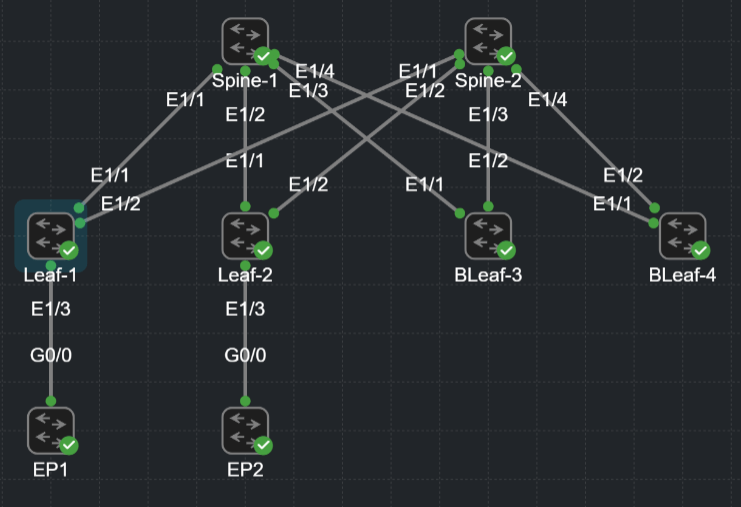
L2VPN EVPN eBGP Overlay – Configuration
First we can enable our address-family l2vpn evpn globally, followed by the configuration for our L2EVPN peer template. Note here we’re using a peer template and inheriting our base peer-session eBGP-SESSION which has our bfd and password configured.
Within the L2EVPN peer template we must enable our ebgp-multihop and update-source loopback100. This allows us to peer eBGP with loopbacks.
ebgp-multihop 2 allows us two hops to our peer IP, our loopback100 address sits behind our physical interface, hence two hops : interface > loopback.
update-source loopback100 allows us to use our loopback100 IP address 10.255.255.1/32 as our source IP for eBGP peering.
Next within our L2EVPN-POLICY we have the usual l2vpn evpn configuration. Send-community and send-community extended. Standard community for traffic influencing and community extended to allow for distribution of RTs which are very important in VXLAN / EVPN.
router bgp 65200.1
  address-family l2vpn evpn
  template peer L2EVPN
    inherit peer-session eBGP-SESSION
    update-source loopback100
    ebgp-multihop 2
  template peer-policy L2EVPN-POLICY
    send-community
    send-community extended
    soft-reconfiguration inbound
Here we configure our peers, note each peer from Leaf-1 is to our Spine Loopback100 address 10.1.1.1/32 for Spine-1 and 10.2.2.2/32 for Spine-2. Note both Spines have the same ASN.
We inherit the L2EVPN peer template, this has all of our eBGP session configuration.
Also, we must inherit our L2EVPN-POLICY within our neighbors address-family l2vpn evpn. This has our eBGP policy configuraton.
  neighbor 10.1.1.1
    inherit peer L2EVPN
    remote-as 65100.1
    address-family l2vpn evpn
      inherit peer-policy L2EVPN-POLICY 1
  neighbor 10.2.2.2
    inherit peer L2EVPN
    remote-as 65100.1
    address-family l2vpn evpn
      inherit peer-policy L2EVPN-POLICY 1
At this point you should have L2VPN EVPN eBGP peers established however, there’s no prefixes! To overcome this we rewrite the RT ASN with the rewrite-evpn-rt-asn command.
This is specific to Multi-AS VXLAN / EVPN configurations like this one or multi-site for example. It ensures a local ASN for RT imports is used, this behaviour is caused by auto route target, which utilises the local ASN as the ASN portion of an RT.
For example: An update received on Leaf-1 from Leaf-2 will have the RT ASN portion as 65200.2, but it requires the local ASN 65200.1 to be used. A rewrite of this ensures that each leaf uses its local ASN for Route Target imports and exports. When the RT matches the local ASN and the route is installed.
Cisco explanation of rewrite-evpn-rt-asn
If this wasn’t complex enough, in our configuration because we’re using 8-byte ASNs and RTs are 8-bytes we actually won’t see the local ASN in the L2VPN EVPN RIB. We see AS_TRANS 23456. (Similar to RFC6793).
See example in confirmation section.
  neighbor 10.1.1.1
    address-family l2vpn evpn
      rewrite-evpn-rt-asn
  neighbor 10.2.2.2
    address-family l2vpn evpn
      rewrite-evpn-rt-asn
Next we need to ensure our Next hop addresses stay as the leaf loopback100. Not our Spines Loopback100!
When the next hops of received routes are the Loopback100 address of the Leaf we can use the underlay to route to the loopbacks. If we use Spines as the next hops received in L2VPN EVPN routes the Nexus will think it’s VTEP is directly connected and two hops away at another Leaf. The NVE peering should show our destination Leaf Loopback IP (VTEP).
The following configuration ensures we do not change our next hop in L2VPN EVPN. We start by configuring our route-map. Then move to bgp initially configuring the route-map globally under address-family l2vpn evpn and then per neighbor (In our case the peer-policy L2EVPN-POLICY)
route-map NEXT-HOP-UNCHANGED permit 10
  set ip next-hop unchanged
!
router bgp 65200.1
  address-family l2vpn evpn
    nexthop route-map NEXT-HOP-UNCHANGED
  template peer-policy L2EVPN-POLICY
    route-map NEXT-HOP-UNCHANGED out
L2VPN EVPN eBGP Overlay – Confirmation
Start by checking our bgp l2vpn evpn peers. From the Leaf nodes we should peering for our Spine loopbacks only. Not here, we can see prefixes received of Type-2, Type-3 and Type-5.
LEAF-1# sh bgp l2vpn evpn summ
BGP summary information for VRF default, address family L2VPN EVPN
BGP router identifier 10.255.255.1, local AS number 4272947201
BGP table version is 587, L2VPN EVPN config peers 2, capable peers 2
17 network entries and 25 paths using 5196 bytes of memory
BGP attribute entries [16/5888], BGP AS path entries [1/10]
BGP community entries [0/0], BGP clusterlist entries [0/0]

Neighbor        V    AS    MsgRcvd    MsgSent   TblVer  InQ OutQ Up/Down  State/PfxRcd
10.1.1.1        4 4266393601
                              1052        986      587    0    0 14:16:49 6
10.2.2.2        4 4266393601
                              1075        993      587    0    0 14:19:49 6

Neighbor        T    AS PfxRcd     Type-2     Type-3     Type-4     Type-5     Type-12
10.1.1.1        I 4266393601
                        6          2          2          0          2          0
10.2.2.2        I 4266393601
                        6          2          2          0          2          0
Now we can check the L2VPN EVPN RIB. Below is a snippet which shows our Type-2 and Type-3 EVPN routes. We can see the endpoints 172.16.100.10 and 172.16.100.20 configured in VLAN100 which is mapped to our L2VNI 160100. The MAC address listed in the Type-2 routes is the MAC address of the SVI on the connected endpoint where 172.16.100.X is configured.
Example: EP1 SVI100 is 172.16.100.10, MAC: 5254.0067.8064
LEAF-1# sh bgp l2vpn evpn
BGP routing table information for VRF default, address family L2VPN EVPN
BGP table version is 587, Local Router ID is 10.255.255.1
Status: s-suppressed, x-deleted, S-stale, d-dampened, h-history, *-valid, >-best
Path type: i-internal, e-external, c-confed, l-local, a-aggregate, r-redist, I-injected
Origin codes: i - IGP, e - EGP, ? - incomplete, | - multipath, & - backup, 2 - best2

   Network            Next Hop            Metric     LocPrf     Weight Path
Route Distinguisher: 10.255.255.1:32867    (L2VNI 160100)
*>e[2]:[0]:[0]:[48]:[5254.0041.8064]:[0]:[0.0.0.0]/216
                      10.255.255.2                                   0 4266393601 4272947202 i
*>l[2]:[0]:[0]:[48]:[5254.0067.8064]:[0]:[0.0.0.0]/216
                      10.255.255.1                      100      32768 i
*>e[2]:[0]:[0]:[48]:[5254.0041.8064]:[32]:[172.16.100.20]/272
                      10.255.255.2                                   0 4266393601 4272947202 i
*>l[2]:[0]:[0]:[48]:[5254.0067.8064]:[32]:[172.16.100.10]/272
                      10.255.255.1                      100      32768 i
*>l[3]:[0]:[32]:[10.255.255.1]/88
                      10.255.255.1                      100      32768 i
*>e[3]:[0]:[32]:[10.255.255.2]/88
                      10.255.255.2                                   0 4266393601 4272947202 i
Now we can dive deeper into this to find out more information about our RTs and next hops. Below is a snippet which shows in detail the l2vpn evpn route for our EP1 on MAC 5254.0041.8064.
We can see the next hop received and our Extcommunity which has our RT configured with local ASN.
This is really important to confirm, our route-map to ensure next-hop isn’t changed influences the next hop seen here. We see on Leaf-1 the next hop is correctly configured as Leaf-2 *NOT OUR SPINE.
The rewrite-evpn-rt-asn influences the Extcommunity, rewriting to our lcoal ASN (Unless we’re using 8-byte ASNs where we use the TRANS_AS 23456).
Note our RT is made up of local ASN and : L2VNI
LEAF-1# sh bgp l2vpn evpn 5254.0041.8064
BGP routing table information for VRF default, address family L2VPN EVPN
Route Distinguisher: 10.255.255.1:32867    (L2VNI 160100)
BGP routing table entry for [2]:[0]:[0]:[48]:[5254.0041.8064]:[0]:[0.0.0.0]/216, version 585
Paths: (1 available, best #1)
Flags: (0x000212) (high32 00000000) on xmit-list, is in l2rib/evpn, is not in HW

  Advertised path-id 1
  Path type: external, path is valid, is best path, no labeled nexthop, in rib
             Imported from 10.255.255.2:32867:[2]:[0]:[0]:[48]:[5254.0041.8064]:[0]:[0.0.0.0]/216
  AS-Path: 4266393601 4272947202 , path sourced external to AS
    10.255.255.2 (metric 0) from 10.1.1.1 (10.1.1.1)
      Origin IGP, MED not set, localpref 100, weight 0
      Received label 160100
      Extcommunity: RT:23456:160100 ENCAP:8
If we look at the L3VNI associated we can see some additional Extcommunity RT and the RMAC of our Leaf, this RMAC and next hop should match our NVE PEERS.
Route Distinguisher: 10.255.255.1:4    (L3VNI 212121)
BGP routing table entry for [2]:[0]:[0]:[48]:[5254.0041.8064]:[32]:[172.16.100.20]/272, version 488
Paths: (1 available, best #1)
Flags: (0x000202) (high32 00000000) on xmit-list, is not in l2rib/evpn, is not in HW

  Advertised path-id 1
  Path type: external, path is valid, is best path, no labeled nexthop
             Imported from 10.255.255.2:32867:[2]:[0]:[0]:[48]:[5254.0041.8064]:[32]:[172.16.100.20]/272
  AS-Path: 4266393601 4272947202 , path sourced external to AS
    10.255.255.2 (metric 0) from 10.2.2.2 (10.2.2.2)
      Origin IGP, MED not set, localpref 100, weight 0
      Received label 160100 212121
      Extcommunity: RT:23456:160100 RT:23456:212121 ENCAP:8 Router MAC:5243.df92.1b08
Again, our NVE peer is our Leaf-2 Loopback100 address. *NOT OUR SPINE
LEAF-1# show nve peers
Interface Peer-IP                                 State LearnType Uptime   Router-Mac
--------- --------------------------------------  ----- --------- -------- -----------------
nve1      10.255.255.2                            Up    CP        14:43:14 5243.df92.1b08
I’ve jumped ahead here as we’ve not configured VXLAN yet… I will be skipping the explanation of that part this time.
VXLAN doesn’t change whether we use eBGP as an underlay, ISIS or OSPF. The main option being, are you using multicast or are you using ingress-replication protocol bgp in your NVE.
So here’s a link to my earlier post where I’ve configured this with an ISIS underlay.
4. Single-Pod VXLAN / EVPN – VXLAN Overlay – Internet Plumbing
The ISIS lab is VPC’d, the only configuration difference would be removing the secondary IP on the VTEP loopback, ensure VTEPs are unique for each leaf, remove advertise-pip in L2VPN EVPN BGP and remove advertise virtual-rmac configuration from the NVE.
A final note: The endpoint connectivity in this lab works between EP1 and EP2. See below standard confirmations.
Remember, your NVE peer is your destination Leaf loopback *NOT YOUR SPINE
LEAF-1# sh mac address-table
Legend:
        * - primary entry, G - Gateway MAC, (R) - Routed MAC, O - Overlay MAC
        age - seconds since last seen,+ - primary entry using vPC Peer-Link,
        (T) - True, (F) - False, C - ControlPlane MAC, ~ - vsan,
        (NA)- Not Applicable A – ESI Active Path, S – ESI Standby Path
   VLAN     MAC Address      Type      age     Secure NTFY Ports
---------+-----------------+--------+---------+------+----+------------------
C  100     5254.0041.8064   dynamic  NA         F      F    nve1(10.255.255.2)
*  100     5254.0067.8064   dynamic  NA         F      F    Eth1/3
EP1#traceroute 172.16.100.20
Type escape sequence to abort.
Tracing the route to 172.16.100.20
VRF info: (vrf in name/id, vrf out name/id)
1 172.16.100.20 7 msec 8 msec *EP1#ping 172.16.100.10
Type escape sequence to abort.
Sending 5, 100-byte ICMP Echos to 172.16.100.10, timeout is 2 seconds:
!!!!!
Success rate is 100 percent (5/5), round-trip min/avg/max = 1/1/1 ms
EP1#
EP1#
EP1#ping 172.16.100.20
Type escape sequence to abort.
Sending 5, 100-byte ICMP Echos to 172.16.100.20, timeout is 2 seconds:
!!!!!
Success rate is 100 percent (5/5), round-trip min/avg/max = 6/7/10 msEP2#sh ip arp
Protocol Address Age (min) Hardware Addr Type Interface
Internet 172.16.100.1 16 0011.2233.4455 ARPA Vlan100
Internet 172.16.100.10 148 5254.0067.8064 ARPA Vlan100
Internet 172.16.100.20 - 5254.0041.8064 ARPA Vlan100 Internet Plumbing