
Now we have our base Kubernetes build installed we can begin our Cilium installation. The following links came in handy.
Cilium Quick Installation — Cilium 1.18.1 documentation
Tutorial: Tips and Tricks to install Cilium
All of the following configuration was carried out directly on the Controlplane node. (I have been told this absolutely isn’t best practice, I should use the API at 6443 however, I haven’t got there yet in my lab).
First things first I installed snap…. this then allowed me to install Helm and the Cilium Repo within Helm.
sudo snap install helm --classic
helm repo add cilium https://helm.cilium.io/
helm repo update
Next I followed this up with the Cilium CLI Install (This only installs the CLI, not Cilium itself).
CILIUM_CLI_VERSION=$(curl -s https://raw.githubusercontent.com/cilium/cilium-cli/main/stable.txt)
CLI_ARCH=amd64
if [ "$(uname -m)" = "aarch64" ]; then CLI_ARCH=arm64; fi
curl -L --fail --remote-name-all https://github.com/cilium/cilium-cli/releases/download/${CILIUM_CLI_VERSION}/cilium-linux-${CLI_ARCH}.tar.gz{,.sha256sum}
sha256sum --check cilium-linux-${CLI_ARCH}.tar.gz.sha256sum
sudo tar xzvfC cilium-linux-${CLI_ARCH}.tar.gz /usr/local/bin
rm cilium-linux-${CLI_ARCH}.tar.gz{,.sha256sum}
Next we install Cilium, at great pain I realised after more hours than I should admit and help from a colleague my helm-set commands didn’t work due to spaces in the text editor I was copying from.
Some points to note with the –helm-set options, i’m running Cilium in native routing mode (Not the default tunnel mode with VXLAN) and I am enabling the BGP controlplane. As I understand it the routing mode can’t be changed after installation.
It’s important we set our native routing cidr to the subnet that connects our Ubuntu VMs to our Spine and Leaf fabric, in our case this is the Inter-VM Network.
cilium install \
--namespace kube-system \
--helm-set ipam.mode=kubernetes \
--helm-set ipv4NativeRoutingCIDR="192.168.100.0/24" \
--helm-set bgpControlPlane.enabled=true \
--helm-set k8s.requireIPv4PodCIDR=true \
--helm-set routingMode=native
Now we can confirm the Cilium Pods are running within Kubesystem
kuebctl get pods -n kubesystem
Next we confirm the Cilium status (May take a moment to move from error to OK after first install, this is OK).
cilium status --wait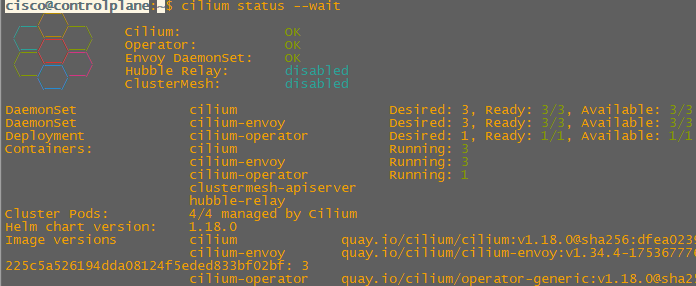
We also need to confirm our Cilium installation has the correct routing mode and BGP is enabled post installation.
cilium config view | grep bgp
cilium config view | grep routing-mode

Pow, that’s it we’ve installed Cilium! Next we can review our VMware networking and then stand up our Kubernetes Namespace, Pods and our external routing with BGP!
 Internet Plumbing