
Since we’ve configured our UNDERLAY we can now proceed to configure the MP-BGP EVPN control plane. The L2VPN EVPN address family in BGP will provide a control plane for sharing MACs whilst enabling multi-tenancy with the use of RTs and RDs which controls VTEP specific MAC updates. When we mention multi-tenant VXLAN / EVPN we’re talking about additional VRFs. Each VRF is a tenant, but that’s another blog.
On to the BGP configuration, I have used the same topology and configuration as the UNDERLAY post.
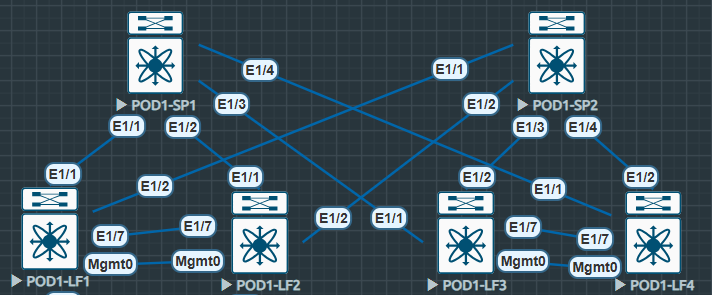
The Spines will act as route-reflectors for the L2VPN EVPN peers again reducing configuration, this also makes for less effort in future if the fabric is scaled up to include more Leaf nodes. We utilise the L2VPN EVPN address family in BGP (MP-BGP) however only the Leaf nodes require EVPN specific configuration as shown below. Similar to VPNV4 configurations, only the PEs deal with the RTs using RDs as that’s where the VPNs terminate (With some exceptions, as always).
MP-BGP L2VPN EVPN SPINE Configuration
First we enable the required features, on the Spines and Leaf we must enable the BGP feature.
#POD1-SP1
feature bgp
We will also need the nv overlay evpn command to ensure we can configure the l2vpn evpn address family
#POD1-SP1
nv overlay evpn
Next we configure our Spines. First enable the l2vpn evpn address family. Under the l2vpn evpn address family we have configured retain route-target all, this ensures all the RTs that are received from Leaf nodes are kept in place! Without this command packets received at the Spine have the RTs removed, when they reach the Leaf with no RT the Leaf won’t know where to send the information
#POD1-SP1
router bgp 65001
  router-id 10.111.111.1
  log-neighbor-changes
  address-family ipv4 unicast
  address-family l2vpn evpn
    retain route-target all
Next i’ve configured peer templates, this ensure minimal configuration on a repeatable basis, all the Leaf nodes will peer with the Spines with the same configuration, the only difference being the loopback IP.
Note the template peer RR-CLIENTs which contains the l2vpn evpn address-family. We update the source as Lo0, it’s best practice to have a central point to peer on the router, we’re not reliant on one path in and out. Not forgetting we’re using ip unnumbered with ISIS.
It’s worth noting at this point all the peering is iBGP and the ASNs are the same on each device, only when we use eBGP in the underlay or peer externally outside of the fabric will we use a different ASN.
Within the l2vpn evpn address-family we have configured send community extended, this is because RTs are carried as extended community attributes. Without this we have no RTs again.
Finally we enable route-reflector-clients on our template and inherit the template on each of the Leaf neighbors as the Spine we’re configuring is the route-reflector.
This configuration is mirrored on all the other Spines, the only difference being the loopback IP of the Spine. To add, as we have no direct connection between the Spines there is no need to complicate the design with RR Clustering.
#POD1-SP1
router bgp 65001
  template peer RR-CLIENTS
    remote-as 65001
    update-source loopback0
    address-family ipv4 unicast
      send-community extended
    address-family l2vpn evpn
      send-community
      send-community extended
      route-reflector-client
  neighbor 10.222.222.1
    inherit peer RR-CLIENTS
  neighbor 10.222.222.2
    inherit peer RR-CLIENTS
  neighbor 10.222.222.3
    inherit peer RR-CLIENTS
  neighbor 10.222.222.4
    inherit peer RR-CLIENTS
MP-BGP L2VPN EVPN LEAF Configuration
Next we configure the Leaf nodes, similarly to the Spines we configure the l2vpn evpn address-family globally.
We then create our RR-SPINE template followed by our neighbor parameters, also again ensuring we send-community extended to ensure our RTs get to the destination leaf.
Finally our Spine peers inherit the template. Note there is no reference to route-reflectors here, the only RR configuration is required on the reflector itself not the clients.
#POD1-LF1
router bgp 65001
  router-id 10.222.222.2
  log-neighbor-changes
  address-family ipv4 unicast
  address-family l2vpn evpn
  template peer RR-SPINE
    remote-as 65001
    update-source loopback0
    address-family ipv4 unicast
      send-community extended
    address-family l2vpn evpn
      send-community
      send-community extended
  neighbor 10.111.111.1
    inherit peer RR-SPINE
  neighbor 10.111.111.2
    inherit peer RR-SPINE
There is more “BGP” related configuration to complete when we configure our VXLAN, L2VNI (BD) and L3VNI (VRF).
Only a basic check here just to confirm peers are established, we will go further into the L2VPN EVPN BGP RIB and confirm RTs once the configuration is completed.
POD1-LF1# sh bgp l2vpn evpn summ
BGP summary information for VRF default, address family L2VPN EVPN
BGP router identifier 10.222.222.2, local AS number 65001
BGP table version is 436, L2VPN EVPN config peers 2, capable peers 2
20 network entries and 34 paths using 5224 bytes of memory
BGP attribute entries [18/2952], BGP AS path entries [0/0]
BGP community entries [0/0], BGP clusterlist entries [4/16]

Neighbor        V    AS MsgRcvd MsgSent   TblVer  InQ OutQ Up/Down  State/PfxRcd
10.111.111.1    4 65001     228     125      436    0    0 01:38:06 10
10.111.111.2    4 65001     226     125      436    0    0 01:37:45 10
POD1-SP1# sh bgp l2vpn evpn summ
BGP summary information for VRF default, address family L2VPN EVPN
BGP router identifier 10.111.111.1, local AS number 65001
BGP table version is 268, L2VPN EVPN config peers 4, capable peers 4
18 network entries and 24 paths using 4776 bytes of memory
BGP attribute entries [10/1640], BGP AS path entries [0/0]
BGP community entries [0/0], BGP clusterlist entries [0/0]
Neighbor V AS MsgRcvd MsgSent TblVer InQ OutQ Up/Down State/PfxRcd
10.222.222.1 4 65001 159 162 268 0 0 01:40:57 6
10.222.222.2 4 65001 157 177 268 0 0 01:41:02 6
10.222.222.3 4 65001 169 152 268 0 0 01:40:56 6
10.222.222.4 4 65001 171 153 268 0 0 01:40:57 6 Next onto our VXLAN configuration….
 Internet Plumbing