
I thought it was worth providing an overview of the VM networking I have configured within the lab.
Each of my VMs is configured with the following networking

As per the design, Bridged (Automatic) is utilised for management of the Kubernetes cluster. The custom VMNET10 adapter is utilised for connectivity between the Ubuntu VMs and CML. At some point I will need to add an additional adapter with an additional external connector in CML for our inter Kubernetes node L2VNI.
Now we can look at adding our new custon bridge in CML. We do this by logging into our CML cockpit on port 9090 https://192.168.0.250:9090/
Cisco has a useful guide regarding additional external connectors External Connectors – Cisco Modeling Labs v2.9 – Cisco DevNet
Under the networking tab we “Add Bridge”.

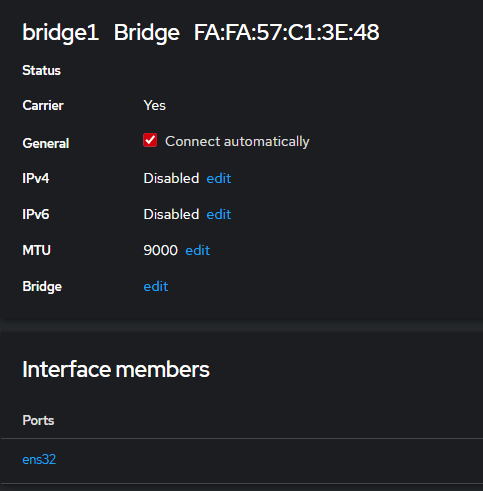
After the new bridge is added we need to disable IPv4 and IPv6. If we don’t the bridge drops until it receives an IP. An increase of the MTU is also a safe bet at 9000 although we don’t expect any VXLAN traffic to pass through this bridge.
We also need to add in our physical interface to the bridge (This is the interface that appears on the CML Ubuntu server after we’ve added an additional network adapter in VMware Workstation, it’s worth doing a before and after and confirming MACs).
Here we’re utilising ens32.
Now we can add our custom bridge1 to our CML lab using an external connector.
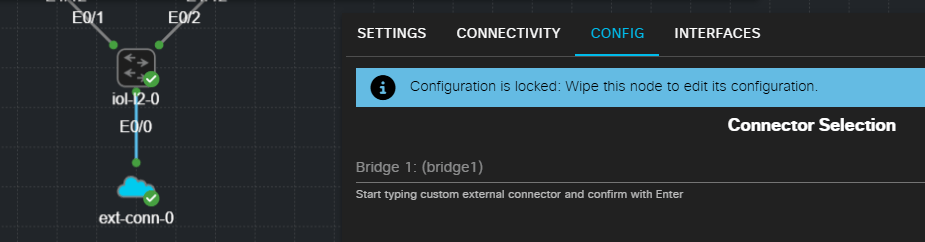
From memory this didn’t show up straight away and did require a reboot of the CML server. There is a best practice process at the Cisco link which Involves adding network adapters without connect at power on enabled until after the bridge is configured.
 Internet Plumbing